Stop sending static PDFs. Compare 10 top tools for sharing live client dashboards, including Analify, Databox, and AgencyAnalytics. Find the right fit now.
If you've ever felt the soul-crushing dread of manually compiling another Monday morning report, a core challenge of effective client reporting, you know there has to be a better way. And darling, there is.
We’ve all been there: hunched over a spreadsheet, drowning in tabs, trying to make sense of a dozen different platforms before a client call. It’s a massive time sink, and it's not just a feeling—the numbers back it up. A recent Databox study found that 50% of the time agencies spend on reporting goes toward analyzing what happened and explaining the data to clients.
To make matters worse, according to a study from Swydo, marketers spend an average of 3.55 hours each week on data analysis and reporting tasks. That's nearly half a workday, every single week, just spent on wrangling data. This guide is here to give you that time back. We're diving deep into the top 10 live dashboard tools, comparing the features that actually matter to agencies: client access, integrations, and of course, pricing.
How We Evaluated the Top Client Dashboard Tools
Alright, let's pull back the curtain. We didn't just throw a bunch of logos on a page. To give you the most honest and useful comparison, we evaluated over 15 tools based on five core pillars essential for agency success:
- Integration Quality
- Client Experience (UX)
- Customization Capabilities
- Data Accuracy (Refresh Rates)
- Pricing Models
Our analysis is based on verified product information, official pricing pages, and common agency use cases as of January 2024. We live and breathe this stuff, so you can trust we’ve done the homework.
What to Look for in a Client Dashboard Tool
Before we jump into the list, let's get on the same page about what makes a client dashboard tool truly great. It's not just about pretty charts; it's about functionality that saves you time and makes you look like a rockstar to your clients.
Integrations
First things first: integrations. A dashboard is only as good as the data it can pull. You need a tool that seamlessly connects to the platforms you and your clients use every day, like Meta, Google Ads, GA4, TikTok, and Shopify, and many agencies have specific Facebook ads reporting tools they rely on. The more native integrations, the less time you spend wrestling with third-party connectors.
White-Label Customization
Next up, making it yours. Your reports should look like your reports, not a software company's. White-label reporting is a feature that allows an agency to remove the software provider's branding from client-facing dashboards and replace it with their own logo, colors, and custom domain. According to Softr, this helps you deliver a more polished, professional experience—especially important for agencies.
Client Access & Security
So, how will your clients actually see their data? A client portal is a secure, centralized online hub where clients can log in to view their live client reporting dashboard and access reports. This is far more professional and secure than a public link anyone can open.
Pro Tip: For clients with sensitive data, look for tools with SOC 2 or GDPR compliance. This is a non-negotiable sign of professionalism and shows you take their data security seriously.
Automation & Data Refresh
The whole point of a "live" dashboard is to kill manual updates. The data refresh rate is the frequency at which a dashboard tool automatically pulls new data from its connected sources, such as every hour or every 24 hours. This is what makes a live dashboard—a web-based reporting interface that automatically syncs with data sources to display up-to-the-minute performance metrics—so powerful.
Ease of Use & Setup Time
Finally, let's talk setup. A tool packed with a million features is useless if it takes a data scientist three weeks to set up a single dashboard. The best tools offer pre-built report templates and an intuitive drag-and-drop interface, letting you get a professional-looking report ready in minutes, not days.
Analify AI — شاشة الـ media buyer مجاناً
بطّل تخمين أرقام الربح.
وصّل Shopify وMeta وTikTok وBosta في 5 دقايق.
ابدأ مجاناً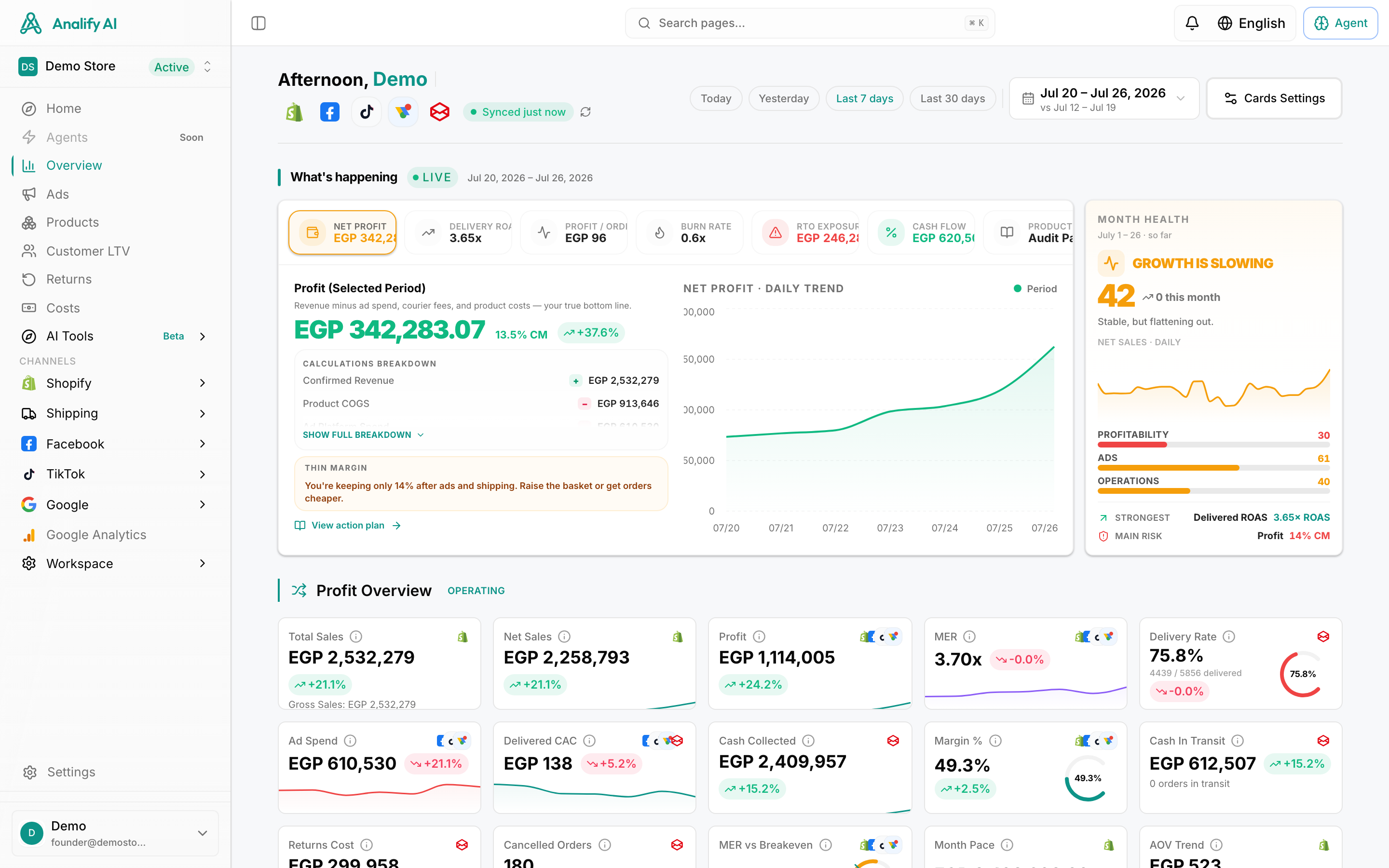
At a Glance: Comparison of the Top Client Dashboard Tools
Tool Best For Key Integrations Client Access Method Data Refresh Rate
Analify E-commerce & Performance Marketing Agencies Meta, Google, TikTok, Shopify, GA4, Klaviyo Secure Link Real-time
AgencyAnalytics Full-Service & SEO Agencies 80+ (SEO, Social, PPC) Secure Portal & Link 24h (up to 1h)
Databox Startups & Small Agencies 130+ (Broad Mix) Secure Link 24h (up to 1h)
DashThis Simplicity & Aesthetics 40+ (Core Marketing) Secure Link & Portal 24h
Swydo Large Teams on a Budget 30+ (PPC & Social) Secure Link & Portal 24h
Looker Studio Google-Centric & Tech-Savvy Agencies Google Suite (Native) Secure Link 12h (up to 1h)
Klipfolio Data-Heavy & BI-Focused Agencies 100+ & Custom APIs Secure Link & Portal Real-time (Varies)
Whatagraph Large Agencies with Big Budgets 45+ (Marketing Focus) Secure Link 24h (up to 1h)
NinjaCat Enterprise & Multi-Location Agencies 150+ (incl. Call Tracking) Secure Portal 24h (up to 1h)
TapClicks Agencies Needing Niche Integrations 250+ (Very Broad) Secure Portal 24h (up to 1h)
The 10 Top Tools for Live Client Dashboards
1. Analify
Positioning: Analify is a powerful client reporting and business dashboard platform built specifically for performance marketers. It brings all your ad and e-commerce data into one real-time, command center, so agencies can track performance, prove ROI, and make faster, smarter decisions.
While many tools focus only on reporting, Analify stands out by combining live reporting, AI diagnostics, and automated action tools in one system—making it ideal for AI ad tools for multi-client management.
Best for: E-commerce agencies and performance marketers who need fast, accurate client reporting and blended performance dashboards across Meta, Google, TikTok, and Shopify.