
“Which clients need attention before our morning meeting?”
Priority clients and reasons to investigate
AgencyBeta
See your ecommerce clients in one portfolio. Spot falling sales, rising ad spend and delivery problems. Ask the Portfolio Agent what changed, then open the right Brand to take action.
Agency View is in Beta. Request access to join.
Illustrative data — sample business and numbers.
Works with the tools you already use
 MetaTikTokGoogle AdsbetaGA4BostaWhatsAppClaudeChatGPTClaude CodeCodexCursorMetaTikTokGoogle AdsbetaGA4BostaWhatsAppClaudeChatGPTClaude CodeCodexCursorMetaTikTokGoogle AdsbetaGA4BostaWhatsAppClaudeChatGPTClaude CodeCodexCursor
In one sentence
Analify Agency gives ecommerce agencies one place to review independent client Brands. Compare sales, advertising, creatives, shipping and returns. Ask the Portfolio Agent which clients need attention and why. Each Brand keeps its own Business Brain, team, data and permissions. When action is needed, open that Brand's workspace.
Connect client Brands
Who needs attention?
Which client needs me first?
Nordic Home. Sales fell 12% while Meta spend rose 18%. Two campaigns are losing money after returns.
Illustrative data — sample business and numbers.
Without Analify
With Analify
Open client accounts one by one, even when nothing important changed.
Start with the Brands showing changes that need attention.
Pull separate reports together before you can compare client performance.
Compare connected Brands in Portfolio views and ask the Portfolio Agent.
Switch between client tools while keeping their rules and access straight.
Open the right Brand. Its own Brain, team and permissions stay in place.
Morning check-in and Attention tracking bring important changes forward. Find clients with falling sales, rising spend, conversion problems or increasing returns, while quieter accounts stay out of the way.
Illustrative data — sample business and numbers.
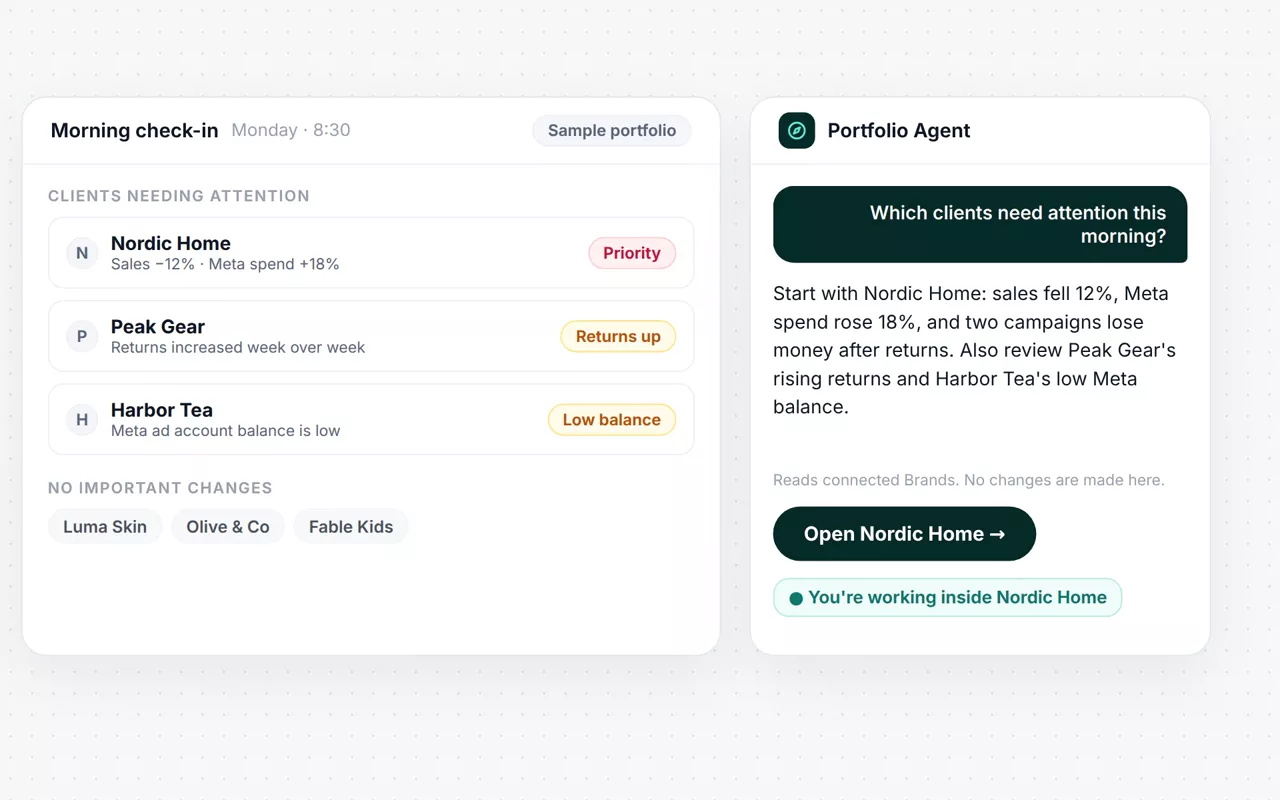
The Portfolio Agent investigates across connected Brands and compares the evidence behind each finding. Ask a follow-up in its full-page conversation, then open the relevant client for deeper work.
Which clients need attention this morning?
Start with Nordic Home: sales fell 12%, Meta spend rose 18%, and two campaigns lose money after returns. Also review Peak Gear's rising returns and Harbor Tea's low Meta balance.
Supporting evidence
| Client | Ad spend | Sales |
|---|---|---|
| Nordic Home | +18% | −12% |
| Peak Gear | +2% | −1% |
| Harbor Tea | 0% | +3% |
Reads connected Brands. No changes are made here.
Open Nordic HomeIllustrative data — sample business and numbers.
Open the Brand to act. Inside Nordic Home, Aziz can prepare a supported change for review. Execution requires approval and follows Nordic Home's own Business Brain rules, roles and permissions.
You're working inside Nordic Home· Your role here: Ads Manager
Pause 2 Meta campaignsBoth campaigns lose money after returnsNordic Home's permissions
This action follows Nordic Home's own permissions and requires approval before execution.
Illustrative data — sample business and numbers.
Portfolio views
Switch between tables and charts to compare the metrics your agency needs. Explore a Sample portfolio before connecting clients, and check advertising account status, balances and available payment information.
| Client | Profit yesterday | Ad spend | Returns rate |
|---|---|---|---|
| Luma Skin | $9,300 | $2,410 | 4.1% |
| Olive & Co | $8,400 | $1,980 | 4.6% |
| Peak Gear | $7,100 | $2,050 | 9.6% |
| Nordic Home | $6,900 | $3,240 | 7.9% |
| Harbor Tea | $5,200 | $1,460 | 3.9% |
| Fable Kids | $4,900 | $1,500 | 5.2% |
Nordic Home · MetaActiveHarbor Tea · MetaLow balanceShows available account status, balances and payment information.
Illustrative data — sample business and numbers.
Client independence
Every client Brand keeps its own data, Business Brain, team and permissions. Manage client access without merging accounts. Use Contract coverage to choose which Brands fall under the agency contract and which pay for their own Analify plan.
Revoke access
Nordic Home
Illustrative data — sample business and numbers.
See the portfolio, find what needs attention, investigate across Brands and manage access without mixing client businesses.
Profit yesterday by client
Client portfolio
Review connected client Brands together without opening every business separately.
Portfolio views
Compare client performance in tables or charts using the metrics you choose.
Sample portfolio
Explore Agency View with sample data before connecting real client organizations.
Attention tracking
Morning check-in
Start with client accounts where performance changed instead of checking every account equally.
Attention tracking
Spot falling sales, rising ad spend, conversion issues, returns and other important changes.
Ad account health
Check account status, balances and available payment information to identify advertising issues.
Why does Nordic Home need attention?
Sales fell 12% while Meta spend rose 18%. Two campaigns are losing money after returns.
Portfolio Agent
Ask questions across connected Brands in the portfolio or a dedicated full-page conversation.
Agency Business Brain
Keep knowledge about your agency's own operations available when reviewing clients.
Cross-client analysis
Compare performance across independent client Brands to find differences worth investigating.
Creative comparisons
Compare leading advertising creatives and signs of fatigue across client accounts.
Delivery comparisons
Find differences in shipping and return performance between client businesses.
Cross-client reports
Build portfolio-level reports to keep performance across connected Brands visible.
Nordic Home · Independent Brand
Client access management
Create, connect or request access to Brands, and revoke access when the relationship changes.
Agency team
Manage agency members, their roles and the permissions they need for client work.
Contract coverage
Choose which Brands the agency contract covers and which pay for their own Analify plan.
Agency billing
Manage billing at the Agency level as the organization model expands. Availability may vary.
Open the Brand to act
Enter the relevant Brand workspace for supported actions under its own permissions and approvals.
Client independence
Each Brand keeps its own Brain, team, data, integrations, reports, dashboards and billing relationship.
Illustrative data — sample business and numbers.
Compare business performance and investigate issues while each Brand maintains its own workspace and access.
The portfolio
Attention signals
Advertising
Delivery
Each client keeps
Agency View is in Beta. Portfolio analysis does not grant cross-client execution. Changes require approval inside the relevant Brand.
“Which clients need attention before our morning meeting?”
Priority clients and reasons to investigate
“Which clients have rising ad spend but declining sales?”
Client comparisons and performance changes
“Which creatives are showing fatigue across our Brands?”
Creative performance and fatigue signals
“Which clients have worsening delivery or return rates?”
Shipping and return comparisons by client
“Build this month's portfolio performance report.”
A cross-client report using available data
“Why is Nordic Home's performance falling? Open its Brand.”
Supporting evidence and a link to the Brand
Ask your AI about it
Client data stays independent
Every Brand keeps its own Business Brain, data, integrations and permissions. Portfolio access doesn't merge them.
Actions stay inside the Brand
The Portfolio Agent analyzes across clients. Changes happen in the relevant Brand under its permissions, after approval.
Client access you control
Create, connect or request access to client Brands. Revoke access when an agency relationship changes.
Roles for your agency team
Manage agency members and assign roles and permissions appropriate to their client responsibilities.
Analify Agency brings independent ecommerce client Brands into one portfolio for comparison, investigation and reporting. The Portfolio Agent helps identify clients needing attention. Agency View is currently in Beta. Select Request access to contact the Analify team about joining.
That works well when you provide accurate, current reports. The ongoing work is gathering, refreshing and keeping each client's information separate. Analify Agency connects permitted client Brands in one portfolio so you can compare available performance data and investigate changes without rebuilding the report bundle each time.
Yes. Each client remains an independent Brand with its own Business Brain, data, integrations, team, permissions, reports, dashboards, Aziz and billing relationship. The Agency portfolio provides controlled cross-client visibility without merging the underlying businesses.
No. The Portfolio Agent analyzes across connected Brands but does not execute cross-client changes. When a campaign needs attention, open the relevant Brand workspace. Any supported change follows that Brand's permissions, business rules and approval requirements.
Client access management lets you create, connect or request access to a Brand organization. Available options depend on your agency's Beta access and permissions. You can revoke client access when the agency relationship changes without merging or deleting the client's independent business.
Yes. Sample portfolio lets you explore the portfolio experience using sample business data before connecting client organizations. You can see how Portfolio views, comparisons and attention signals are presented without needing actual client performance data.
Contract coverage lets you select which client Brands fall under the agency contract and which pay for their own Analify plan. Agency billing is planned to expand as the organization model develops. Consolidated billing is not guaranteed or generally available; confirm supported arrangements during Beta access.
Cross-client reports let you review available performance information across connected Brands at the portfolio level, subject to your access permissions and Beta availability. Each client's own reports, data and workspace remain separate. Reporting does not grant permission to execute changes across clients.
Connect your company, build its memory and start asking, deciding and approving from one place.
See pricing