
“Add this supplier payment to my expenses.”
An entry to review and approve before it counts.
Finance
Your income and expense tracker, product costs, profit and courier cash in one place. Record what moves, connect your apps and see what your ecommerce business actually keeps.
Money sheet
Record money MetaAdvertising−$1,450
Illustrative data — sample business and numbers.
Works with the tools you already use
MetaTikTokGoogle AdsbetaGA4BostaWhatsAppClaudeChatGPTClaude CodeCodexCursorMetaTikTokGoogle AdsbetaGA4BostaWhatsAppClaudeChatGPTClaude CodeCodexCursorMetaTikTokGoogle AdsbetaGA4BostaWhatsAppClaudeChatGPTClaude CodeCodexCursorIn one sentence
Analify Finance is ecommerce finance software that keeps your income, expenses, product costs, profit and courier collections together. Record money, import spreadsheets or let connected apps add entries. Review their sources, catch duplicates, compare product earnings and track cash still owed by couriers. Your financial picture stays connected and reviewable as the business changes.
Record or import
Entries from apps
Profit after available costs
Illustrative data — sample business and numbers.
Auto-add from apps is off until you enable it. Bring in Meta payments and Bosta cash movements as saved rows or drafts, compare paid versus spent, and trace every entry's history.
Auto-add from apps
Off by default. Your sheet stays manual.
MetaMeta: paid versus spent$680 of Meta spend isn't matched by payments recorded here
The difference may reflect an unpaid ad balance or payments made before this reporting period. Check the account and payment dates.
Meta top-upHistory
You edited this row. Meta won't overwrite your changes.
Illustrative data — sample business and numbers.
Without Analify
With Analify
Income in a sheet. Expenses somewhere else. No clear record.
One income and expense tracker with categories and entry history.
Download transactions again whenever you need updated figures.
Connect supported apps and review new rows or drafts as they arrive.
Sales look strong, but you still need to work out what remains.
Check costs, product profit and loss, and outstanding courier cash.
Possible duplicates, uncategorized expenses, missing income and AI-added entries waiting for approval. To review brings the exceptions together so you can fix the records before relying on the totals.
To review
5Check entries that could make your totals wrong.
Possible duplicate$380 · Nov 2
Two entries share a date, amount and category.
2 entries waiting for approval
Added by the Agent or connected AI. Not counted until approved.
3 entries without a category
Included in totals, but not category breakdowns.
You usually record Software around the 3rd$49
Nothing recorded for this month yet.
No income recorded this month
Expenses are recorded, but your sales are missing from the net total.
Illustrative data — sample business and numbers.
Product P&L puts revenue next to available Meta ad spend, product costs, shipping and returns. Find products losing money despite strong sales, and check the costs behind the result.
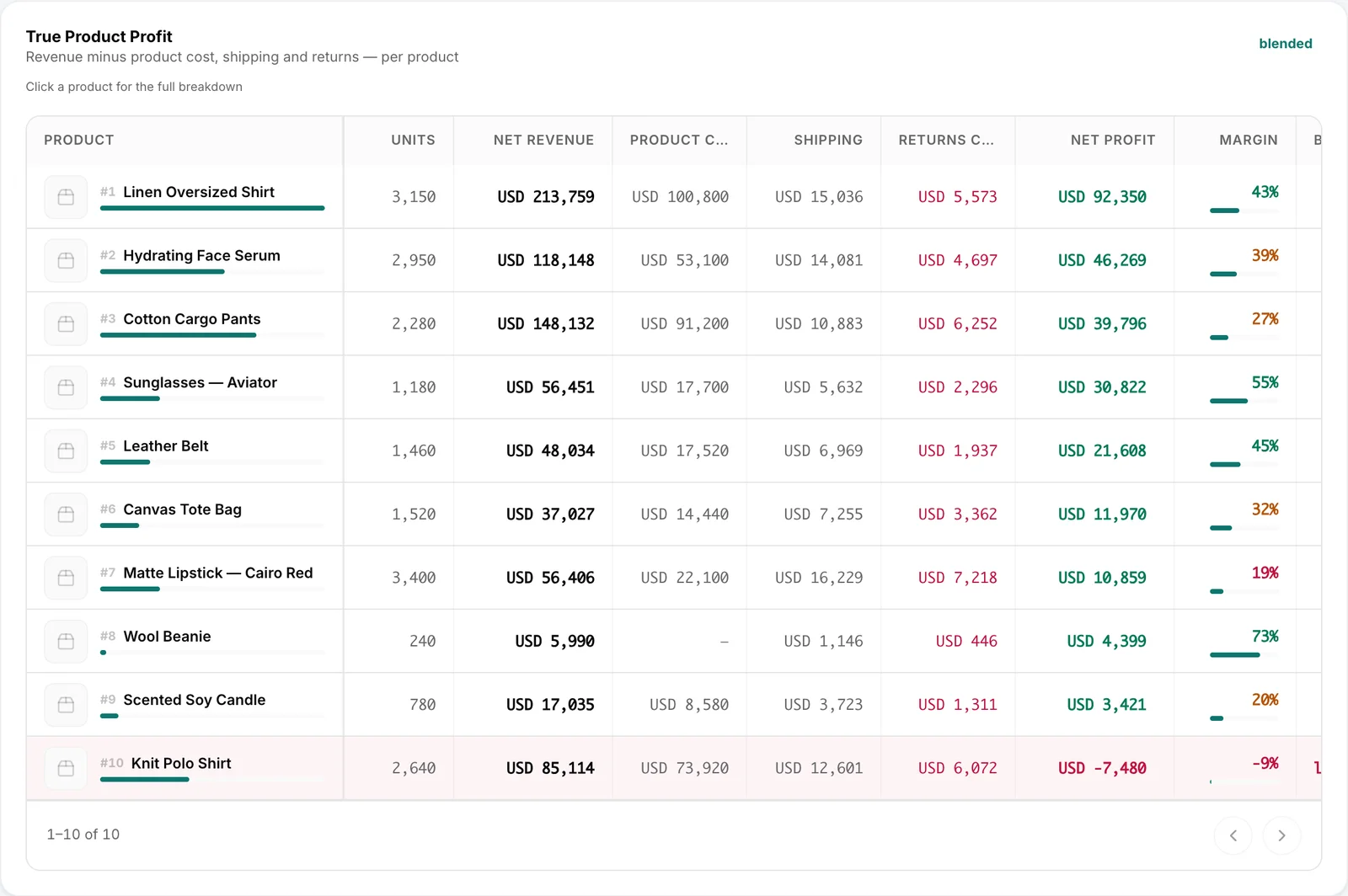
Illustrative data — sample business and numbers.
COD analysis and Cash collection show courier cash that's collected, pending or overdue. Check aging buckets, expected settlement dates and fees without treating expected cash as money already received.
COD analysis
Received
Not yet received
Past expected date
$1,240 in settlements is past its expected payment date
How long courier cash has been held
Expected cash stays pending until the courier settles. It isn't counted as received.
Illustrative data — sample business and numbers.
Record income, bring in transactions, review what needs attention, check profit and track the cash your couriers still owe.
Where the money went · October
Record money
Add income or expenses with a date, category, description, payment method and amount.
Table, categories, months and charts
Switch between individual entries, category breakdowns, six-month trends and income versus expenses.
Money in, money out, cash
See recorded income, expenses, current cash and the net total in your money sheet.
Your own categories
Add, rename or hide categories and keep their colors consistent across every view.
Every entry has a history
See each row's source, creator and edits. Restore the original source value when needed.
Yours once you edit it
Edit a synced row and it becomes yours. Future app syncs won't overwrite your changes.
Match your columns
Import from a spreadsheet
Upload an .xlsx or .csv, match columns and categories, then review every row before saving.
Duplicate protection
Skip previously imported rows and flag possible matches for review before adding them again.
Export
Download your financial entries whenever you need to share them or keep a copy.
App connections
Auto-add from apps
Enable Meta and courier sources to add labeled financial entries. Off by default.
Saved rows or drafts
Choose whether each connected app saves entries directly or sends drafts for your approval.
Choose the ad accounts
Select exactly which connected Meta ad accounts should feed your money sheet.
All history
Import up to three years of available Meta and Bosta transaction history in one step.
Sync now
Run a sync and see when each app last updated your sheet and how many rows it added.
Meta: paid versus spent
Compare payments with Meta spend. TikTok ads: Coming soon. Google card payments: add or import.
To review
Possible duplicates
Review similar transactions and choose whether to keep both or remove the newer entry.
Entries waiting for approval
See financial entries that need your decision before they become part of the sheet.
Entries without a category
Find uncategorized rows. They count toward totals but not category breakdowns until assigned.
Usual entries
Get reminders for recurring expenses, such as rent, and add them with one click.
Missing income
Get warned when expenses are recorded but no income appears, so the net isn't misleading.
AI-added entries wait for you
Agent or connected-AI entries stay out of totals until you review and approve them.
Product P&L · After all costs
Costs & expenses
Track total costs, cost per order, cost as a share of revenue and changes over time.
Product costs
Enter or sync Shopify costs. See missing variant costs and their impact; never guess the gaps.
Profit
See profit after returns, product costs, ads, shipping and other recorded expenses.
Product P&L
See profit per product after ads, shipping, returns and costs, with missing costs flagged.
Courier cash by age
COD analysis
Track collected, pending and overdue cash, aging, settlements, courier fees and net yield.
Cash collection
Review courier collections and outstanding cash. Expected settlements are not money received.
Illustrative data — sample business and numbers.
Record it yourself, bring your spreadsheet or connect your apps. Keep track of the source behind your financial records.
You (manual entry)
Your spreadsheet
Meta
Bosta and your couriers
Agent and connected AI
Shopify
TikTok ad payments: Coming soon. Google card payments must be added manually or imported. Analify records and analyzes money; it never moves it.
“Add this supplier payment to my expenses.”
An entry to review and approve before it counts.
“Import last month's expense sheet and check for duplicates.”
Mapped entries, skipped repeats and possible duplicates to review.
“Did we pay Meta more than it says we spent?”
A comparison of recorded Meta payments and reported ad spend.
“Which products still have missing costs?”
Products and variants with missing costs clearly flagged.
“Which products earned the most after ads, shipping and returns?”
Product P&L using available costs, with missing inputs flagged.
“Which courier settlements are overdue?”
Overdue cash, aging buckets and expected settlement dates.
Ask your AI about it
Nothing from AI counts without approval
Agent and connected-AI entries wait for your approval before entering totals. Auto-add from apps is off by default, and you can choose drafts instead of saved rows.
Financial access stays controlled
Finance is available to owners, admins and the Finance Manager role. Analify records and analyzes your money. It never moves money or makes payments.
No made-up profit or collected cash
Missing product costs or unavailable platform data are flagged, never guessed. Cash expected from couriers stays separate from money already collected.
Every change has a history
See each row's source, creator and edits. Once you edit an app-added row, future syncs won't overwrite it. Restore its original source value whenever needed.
Spreadsheets work, and ChatGPT or Claude can calculate profit from the files you provide. Analify Finance keeps financial entries connected to supported apps, with source history, duplicate checks, approval controls and updated business costs. You can review the records again tomorrow without rebuilding the same analysis.
Only when you enable Auto-add from apps. It's off by default. You choose which supported apps contribute entries and whether they save rows directly or create drafts for review. Entries added by the Analify Agent or connected AI always require your approval before they count toward totals.
Analify skips rows you've already imported and flags transactions that look similar to existing entries. Under To review, you can inspect Possible duplicates and choose to keep both entries or remove the newer one. You review mapped rows before saving the import.
Meta can add top-ups, charges and refunds. Bosta can add cash movements and fees, with supported entries from other connected couriers. You can import up to three years of available Meta and Bosta history. TikTok ad payments are Coming soon. Google card payments must be recorded manually or imported.
Profit depends on the completeness of your product costs, advertising spend, shipping, returns and other available expenses. Analify uses the data it can access and flags missing product costs or unavailable sources instead of inventing figures. Review cost coverage before relying on a profit result.
COD analysis and Cash collection show collected, pending and overdue courier cash, aging buckets, expected settlement dates, courier fees and net yield where available. Analify flags overdue settlements so you can follow up. Expected cash is never presented as money already received.
No. Analify records and analyzes the financial information you enter, import or approve. It doesn't transfer funds, make payments, operate as a bank or replace formal accounting. You can export your entries for your accountant or other financial workflows.
Connect your company, build its memory and start asking, deciding and approving from one place.
See pricing