
Founder's Daily Brief
Yesterday vs previous day
Profit
$980−$270Revenue
$8,300+4%Ad spend
$1,240+9%Returns
$410+12%Needs you Profit fell $270 despite higher revenue. Ad spend and returns both increased.
Reports
Ecommerce reporting software sends each person the business numbers they need on a schedule, so nobody has to pull them together by hand. Analify prepares daily, weekly or monthly reports on sales, ads, profit, stock and shipping from your connected data, and delivers them by email or, on eligible plans, WhatsApp.
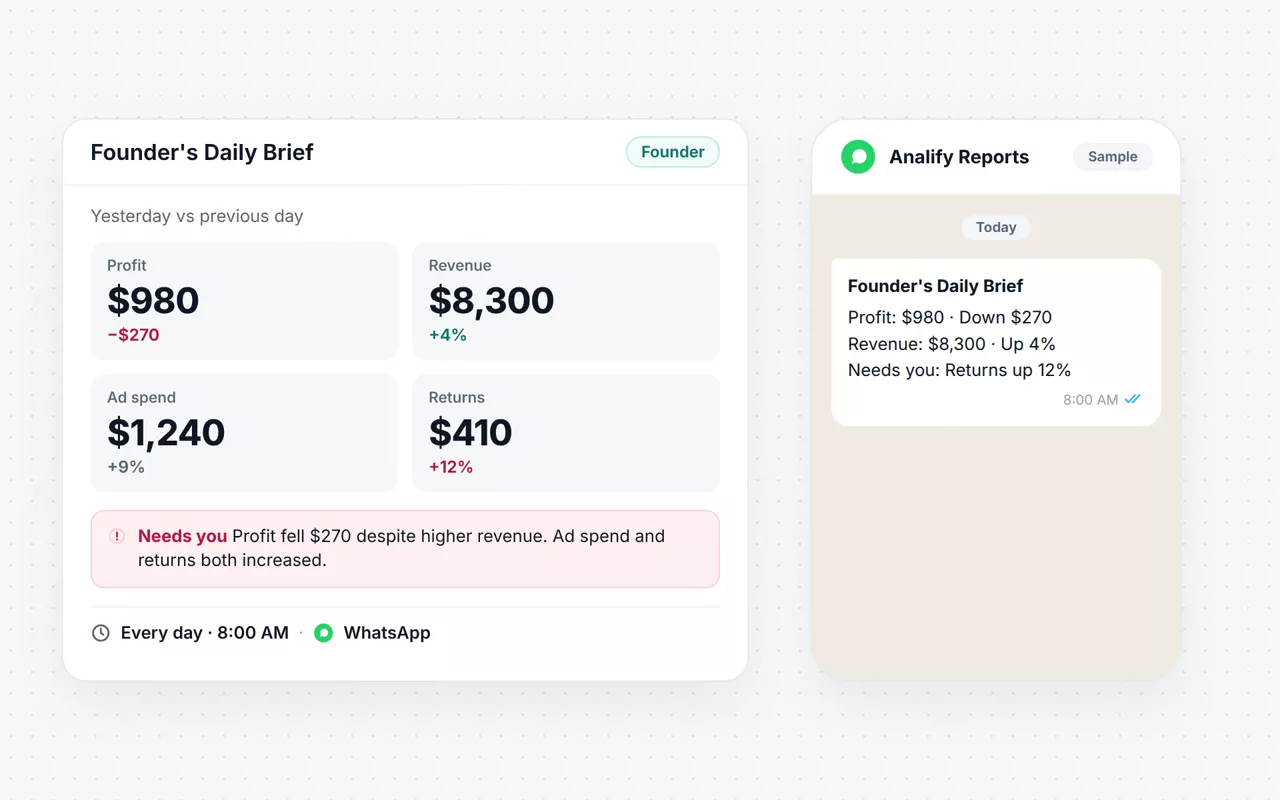
Illustrative data — sample business and numbers.
Works with the tools you already use
 MetaTikTokGoogle AdsbetaGA4BostaWhatsAppClaudeChatGPTClaude CodeCodexCursorMetaTikTokGoogle AdsbetaGA4BostaWhatsAppClaudeChatGPTClaude CodeCodexCursorMetaTikTokGoogle AdsbetaGA4BostaWhatsAppClaudeChatGPTClaude CodeCodexCursor
In one sentence
Analify Reports turn connected ecommerce data into updates for founders, media buyers and teams. Start with a template, choose metrics and comparisons, preview the result, then schedule delivery by email or WhatsApp on eligible plans. In-app notifications help surface updates and alerts. Reports inform people; they never change campaigns, orders or budgets.
Without Analify
With Analify
Export the same numbers and rewrite the weekly summary by hand.
Use connected data to prepare each scheduled report.
The founder, media buyer and operations team all get the same report.
Give each role the metrics and comparisons it needs.
Someone notices a problem only after opening yesterday's spreadsheet.
Set alert thresholds so important changes reach the right people.
Beyond a saved prompt
Keep doing that when it works. Analify Reports handles the repeated work around the report: getting current data, preparing the same checks and sending the update to the right people.
What ChatGPT and Claude already do well
What Analify Reports adds
Use your favorite AI for questions. Let Reports handle the updates everyone expects.
Built for each role
Start with a report for the job. Choose the metrics and comparisons each person needs, highlight what changed, and send it on their schedule.
Yesterday vs previous day
Profit
$980−$270Revenue
$8,300+4%Ad spend
$1,240+9%Returns
$410+12%Needs you Profit fell $270 despite higher revenue. Ad spend and returns both increased.
Yesterday vs previous day
Ad spend
$1,780−3%Cost per order
$18.40−6%Blended ROAS
2.9−0.3Fatiguing creatives
3+2Needs you Blended ROAS fell by 0.3, and 3 creatives are showing signs of fatigue.
This week vs last week
Revenue
$58,300+6%Orders
1,240+5%Ad spend
$12,400+8%New customers
610+3%Needs you Ad spend grew 8%, faster than revenue at 6%. Check what's driving the gap.
This week vs last week
Low-stock products
7+2Out-of-stock products
2+1Units sold
2,140+5%Stock value
$38,900−4%Needs you 7 products are low on stock, and 2 are already out. Review replenishment.
This week vs last week
Delivered orders
1,020+4%Returned orders
96+12%Delivery rate
89%−1.2Shipping cost
$6,420+3%Needs you Returns rose 12% while the delivery rate fell 1.2 points.
This month vs last month
Revenue
$241,000+5%Product cost
$118,000+4%Ad spend
$51,200+7%Profit
$27,400+$3,100Needs you Profit rose $3,100, but ad spend grew faster than revenue.
Illustrative data — sample business and numbers.
Check before it sends
Preview the numbers and message, choose the people who should receive it, and send a test. Activate the schedule only when the report looks right.
Founder's Daily Brief
PreviewSelected recipients
Notification settings
Report email recipients
WhatsApp numbers
Daily delivery time
Illustrative data — sample business and numbers.
Delivered on schedule
Choose when each report goes out and who receives it. Send by email, use WhatsApp on eligible plans, or generate a fresh report when you need one now.
Today
Founder's Daily Brief
8:00
Analify Reports9:00
Marketing Team Weekly · This week vs last
Revenue rose 6%, but ad spend rose 8%. Review the gap and campaign performance.
Generate an updated report when a business decision cannot wait.
Download report
Available for supported reports
Illustrative data — sample business and numbers.
Only what needs attention
Choose how serious a performance change must be. When an important change exceeds your severity threshold, Analify sends an alert by email or WhatsApp.
Your alert threshold
Illustrative data — sample business and numbers.
An alert tells you what changed. Ask Aziz to investigate and prepare a supported action. You review and approve before anything changes.
Start with a ready-made report, choose the numbers that matter, and control when and where your team gets the update.
Reports keep your team informed. They never execute business actions.
“Send me a founder update every Monday morning.”
Weekly schedule drafted for your approval.
“Email my media buyer an ads recap every morning.”
Daily report awaits your approval.
“Send operations a weekly delivery and returns report.”
Recipients and schedule await approval.
“Set up a monthly finance report with a PDF.”
Monthly report drafted for approval.
“Only alert me about serious profit drops.”
Alert threshold ready for your review.
“Send me a test before scheduling the weekly report.”
Test prepared; schedule awaits approval.
Ask your AI about it
Preview, then test
Inspect the report and send a test before activating its recurring delivery.
Your recipients, your channels
Choose who gets each update and whether it arrives by email or eligible WhatsApp delivery.
Consistent business numbers
Review labeled comparison periods, available profit breakdowns and cost coverage before sharing a report.
Information, not execution
Reports and alerts show what changed. They never alter ads, orders, budgets or other business settings.
Analify includes six starter templates: Founder's Daily Brief, Performance Marketer Pulse, Marketing Team Weekly, Inventory Management, Ops & Fulfillment Weekly, and Finance Monthly P&L. You can also build reports around selected metrics and comparison periods.
Enough to decide where attention is needed today: sales next to the profit and costs behind them, ad spend and results, stock signals, and shipping and returns, each compared with the previous period so you can see which way things are moving. In Analify, start from the Founder's Daily Brief template or build your own from blended advertising, Shopify, shipping, Meta, TikTok and Google metric groups. Profit breakdowns keep reported sales from being mistaken for earnings, and delivery and return performance keeps operational losses visible. Preview the report and send a test before the schedule starts, then deliver it by email or, on Pro and above, WhatsApp. Anomaly alerts cover the changes that can't wait for the next report.
Schedule it instead of rebuilding it every week. Start from the Marketing Team Weekly or Ops & Fulfillment Weekly template, or build your own report, and set it to run weekly. Period comparisons show each number against the previous period, so the review opens with what moved: sales next to profit and costs, ads and sales performance together, and shipping and returns. Choose who receives it, preview it and send a test before the schedule starts; it then goes out by email or, on Pro and above, WhatsApp. When something in the review needs a closer look, ask Aziz to investigate it. Reports only inform you; any supported action Aziz prepares waits for your approval.
Send reports by email or WhatsApp, with WhatsApp delivery available on Pro and above. In-app notifications keep you updated inside Analify. PDF and CSV downloads are available for supported reports.
Choose daily, weekly or monthly schedules for recurring updates. You can also generate a report on demand when you need a fresh view before the next scheduled delivery.
Yes. Preview its content, choose recipients and send a test before activating the schedule. If you ask Aziz to create or change a scheduled report, it prepares the setup for your approval.
Anomaly alerts notify you about important performance changes, such as falling profit or rising returns. You choose the severity threshold, and Analify sends an email or WhatsApp alert when a change exceeds it.
No. Reports and alerts only inform you. They cannot pause campaigns, change budgets or edit orders. You can ask Aziz to investigate and prepare a supported action, which requires your approval before execution.
Yes. Give a founder the daily business picture, a media buyer campaign performance, and an operations manager delivery and returns. Each report can have its own metrics, schedule, recipients and delivery channel.
Yes. Connect Shopify and the other supported business sources, choose a report and schedule WhatsApp delivery on Pro or above. Reports can combine available sales, advertising, inventory and shipping information, with data coverage depending on your connections.
Connect your company, build its memory and start asking, deciding and approving from one place.
See pricing